HomeAll servicesAzender, LLC
Service
–
Azender, LLC

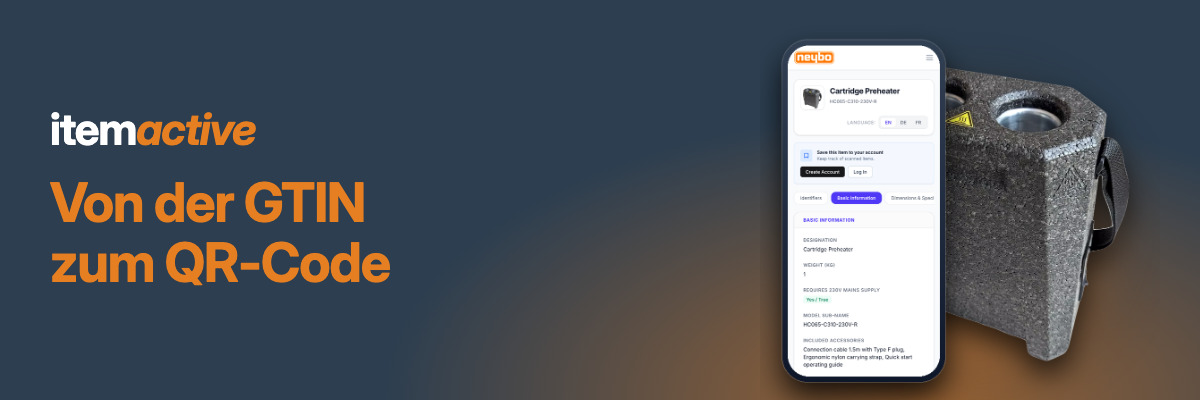
Umstellung von GTIN und EAN auf QR-Codes

Switching from GTIN and EAN to QR codes

GTIN
QR code

Im Rahmen von GS1 Sunrise 2027 wechseln Hersteller und Marken von Barcodes auf 2D-Codes. Wir begleiten Sie dabei: Ihre GTIN bleibt die Grundlage, der QR-Code wird zusätzlich zum Zugang zu Produktpass und Kundenkanälen.

So gehen wir vor

  1. Bestand aufnehmen: Welche Produkte tragen heute GTIN oder EAN, und auf welcher Ebene
  2. Link-Struktur festlegen: GTIN, Charge und Seriennummer als GS1 Digital Link
  3. Datenträger wählen: QR-Code, NFC-Tag oder RFID
  4. Produktpässe anlegen: unter Ihrer eigenen Domain, im eigenen Design, und live schalten

Das bringt es Ihnen

  • Ihre bestehende GTIN bleibt erhalten
  • Ein Code für Produktinformation, Service und Kundenkontakt
  • Auf Wunsch eindeutig bis auf Einzelteilebene

#GTIN #EAN #QRCode #GS1Sunrise2027 #GS1DigitalLink #2DCode #Barcode #DigitalerProduktpass #Serialisierung

With GS1 Sunrise 2027, manufacturers and brands move from barcodes to 2D codes. We guide you through it: your GTIN remains the foundation, and the QR code additionally becomes the way into the product passport and your customer channels.

How we work

  1. Take stock: which products carry a GTIN or EAN today, and at which level
  2. Define the link structure: GTIN, batch, and serial number as a GS1 Digital Link
  3. Choose the data carrier: QR code, NFC tag, or RFID
  4. Create the product passports: on your own domain, in your own design, and go live

What you get

  • Your existing GTIN stays in place
  • One code for product information, service, and customer contact
  • Unique down to the individual piece, if you want it

We are a GS1 Germany Solution Partner.

#GTIN #EAN #QRCode #GS1Sunrise2027 #GS1DigitalLink #2DCode #Barcode #DigitalProductPassport #Serialization

‍Gallery

1. Basic Information

Translate manually?
Generate automatic translation?

Im Rahmen von GS1 Sunrise 2027 wechseln Hersteller und Marken von Barcodes auf 2D-Codes. Wir begleiten Sie dabei: Ihre GTIN bleibt die Grundlage, der QR-Code wird zusätzlich zum Zugang zu Produktpass und Kundenkanälen.

So gehen wir vor

  1. Bestand aufnehmen: Welche Produkte tragen heute GTIN oder EAN, und auf welcher Ebene
  2. Link-Struktur festlegen: GTIN, Charge und Seriennummer als GS1 Digital Link
  3. Datenträger wählen: QR-Code, NFC-Tag oder RFID
  4. Produktpässe anlegen: unter Ihrer eigenen Domain, im eigenen Design, und live schalten

Das bringt es Ihnen

  • Ihre bestehende GTIN bleibt erhalten
  • Ein Code für Produktinformation, Service und Kundenkontakt
  • Auf Wunsch eindeutig bis auf Einzelteilebene

#GTIN #EAN #QRCode #GS1Sunrise2027 #GS1DigitalLink #2DCode #Barcode #DigitalerProduktpass #Serialisierung

Translate manually?

With GS1 Sunrise 2027, manufacturers and brands move from barcodes to 2D codes. We guide you through it: your GTIN remains the foundation, and the QR code additionally becomes the way into the product passport and your customer channels.

How we work

  1. Take stock: which products carry a GTIN or EAN today, and at which level
  2. Define the link structure: GTIN, batch, and serial number as a GS1 Digital Link
  3. Choose the data carrier: QR code, NFC tag, or RFID
  4. Create the product passports: on your own domain, in your own design, and go live

What you get

  • Your existing GTIN stays in place
  • One code for product information, service, and customer contact
  • Unique down to the individual piece, if you want it

We are a GS1 Germany Solution Partner.

#GTIN #EAN #QRCode #GS1Sunrise2027 #GS1DigitalLink #2DCode #Barcode #DigitalProductPassport #Serialization

Generate automatic translation?

2. Quick Facts

Select category(ies)
Select industry(ies)
Select language(s)
No items found.
No items found.

3. Media

The image is too large. Please upload an image with maximum 2400 x 2400 pixels and 3 MB. You can find the recommended dimensions on the ? symbol.
uploading
fileuploaded.jpg
Upload failed. Max size for files is 10 MB.
The image is too large. Please upload an image with maximum 2400 x 2400 pixels and 3 MB. You can find the recommended dimensions on the ? symbol.
uploading
fileuploaded.jpg
Upload failed. Max size for files is 10 MB.
The image is too large. Please upload an image with maximum 2400 x 2400 pixels and 3 MB. You can find the recommended dimensions on the ? symbol.
uploading
fileuploaded.jpg
Upload failed. Max size for files is 10 MB.
The image is too large. Please upload an image with maximum 2400 x 2400 pixels and 3 MB. You can find the recommended dimensions on the ? symbol.
uploading
fileuploaded.jpg
Upload failed. Max size for files is 10 MB.

4. External Link

Update service
Successful! You will be redirected immediately...
Error: Your submission could not be processed due to our automatic spam detection. We sincerely apologize and would ask you to contact us via the chat at the bottom right so that we can correct this error.